MoreExam
1. Question Content...
EXPLANATION
Answer: X - EXPLANATION Content.
Question1: To reduce the risk of users downloading malware to the corporate network, an administrator wants to allow end-users to open only intranet websites inside their virtual desktop. Additionally, the administrator wants to configure all other URLs to automatically open in a browser on the end-user's client machine.Which steps should the administrator take to meet the requirements? (Choose two.)
Question2: Drag and drop the codecs supported by Blast on the left to the appropriate use case on the right.
Question3: Refer to the exhibit.Drag and drop the components on the left that are part of the logical architecture for a single-site deployment of VMware Horizon into their correct position in the diagram on the right.
Question4: What are two Cloud Pod Architecture feature limitations? (Choose two.)
Question5: Which three VMware Horizon based resources does Unified Access Gateway (UAG) provide access to?(Choose three.)
Question6: Refer to the exhibit.An administrator is trying to create an automated farm of instant-clone virtual machines using the Add Farm wizard. The administrator cannot proceed beyond the page displayed in the exhibit.Which of the following could be the reason for the issue?
Question7: Which three VMware Horizon based resources does Unified Access Gateway (UAG) provide access to?(Choose three.)
Question8: Refer to the exhibit.Drag and drop the correct options to build a Simple True 5SO Architecture on the left into the diagram on the right.
Question9: Which storage product allows the pooling of resources to create datastores in a software defined datacenter?
Question10: Refer to the exhibit.An administrator wants to configure a central SYSLOG server.Mark the correct menu option by clicking on it.
Question11: An administrator has added a supported PCI graphics accelerator to a virtual machine configuration. When the administrator tries to power on the virtual machine, an error is displayed and the virtual machine remains powered off.Which of the following virtual machine configuration settings needs to be applied to enable the virtual machine to power on?
Question12: An end-user is experiencing a black screen when connecting to their virtual desktop. After a few seconds, the connection closes. Which could be the cause of the issue? (Choose three.)
Question13: An administrator has been tasked with determining the type of VMware Horizon deployment for their organization.These requirements have been provided to the administrator:* It must support Windows 10 Enterprise multi-session desktops.* It must support App Volumes.* It must support centralized brokering.* It must automatically route end-users to the most appropriate virtual workspace.Which deployment solution meets the requirements?
Question14: Which two scenarios are appropriate for a cloud implementation of a VDI solution over an on-premises solution? (Choose two.)
Question15: A user is complaining that each time they logon they need to change the settings for the e-mail client.Which three options can an administrator deploy to make sure the user's settings are being saved? (Choose three.)
Question16: In a load balanced Horizon POD with three Connection Servers, there are 450 active Blast sessions connected.What happens if one of these Connection Servers runs into an unplanned outage?
Question17: An administrator is tasked with configuring VMware Integrated Printing. They enabled the VMware Integrated Printing feature during the installation of the Horizon Agent in the golden image, and created a Test Desktop Pool. On a physical end-point where the Horizon Client already is installed, the administrator added multiple network printers which are working perfectly. They test the configuration by connecting to the Horizon Desktop with the Horizon Client, unfortunately they do not see the printers within their Horizon Desktop.What could be the reason that the administrator is not seeing the printers within his Horizon Desktop session?
Question18: Drag and drop each Horizon console predefined role on the left to its matching function on the right.
Question19: While creating a new Instant Clone Desktop Pool, an administrator does not see a particular Windows 10 VM available or listed as an option for use as the golden image. Which step must the administrator perform, prior to creating this new desktop pool?
Question20: Drag and drop each Desktop Persistence type on the left to its matching description on the right.
Question21: Refer to the exhibit.Drag and drop the labels on the left for the authentication flow for smart cards into the correct location in the diagram on the right.
Question22: An administrator is configuring load-balancing settings in Horizon Console for a RDSH Farm. Which two check boxes can be selected to influence the load balancing behavior? (Choose two.)
Question23: Refer to the exhibit.An administrator prepared a golden image based on a Windows Server Operating System. They plan to use this image to create a single-session virtual desktop pool. The installation is completed, the virtual machine is turned off, and the snapshot has been created. When the administrator creates the desktop pool, they are unable to select the created image and snapshot. They do see other previously created golden images, based on Desktop Operating Systems.The administrator has opened the Horizon Console.Mark the correct menu option where the administrator can enable Windows Server Operating Systems to be used as single-session desktops by clicking on it.
Question24: How do multiple Horizon Connection Server instances in a pod maintain synchronization?
Question25: An organization with an existing Windows 2012 R2 Server RDSH farm decided to move to Windows Server2019 as their new standard. Order the steps that need to be taken by the administrator to deploy a RDS desktop pool with this new standard.
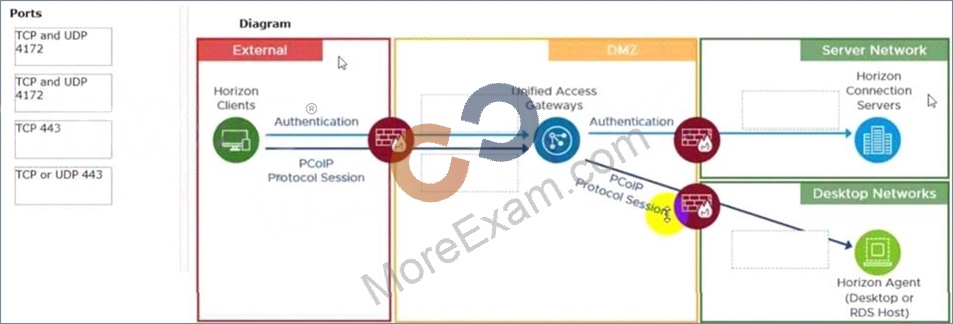
Question26: Refer to the exhibit.Drag and drop the ports on the left to allow an external PCoIP connection through Unified Access Gateway (UAG) into the diagram on the right.